
Tamalpais keyboard layout
Fixing Qwerty, with the fewest changes possible


View from Mount Tamalpais by Tommy L
Go from this (Qwerty):
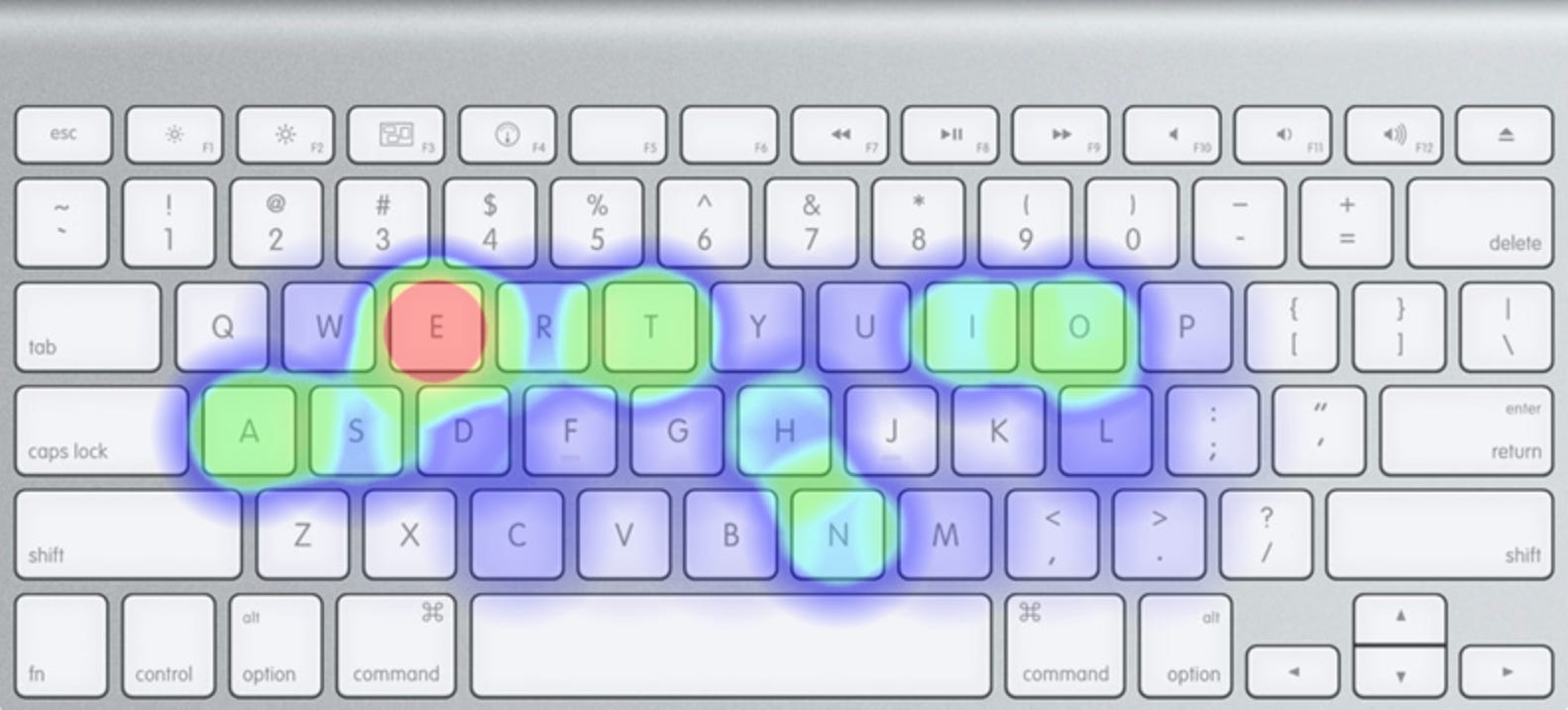
To this (Tamalpais):
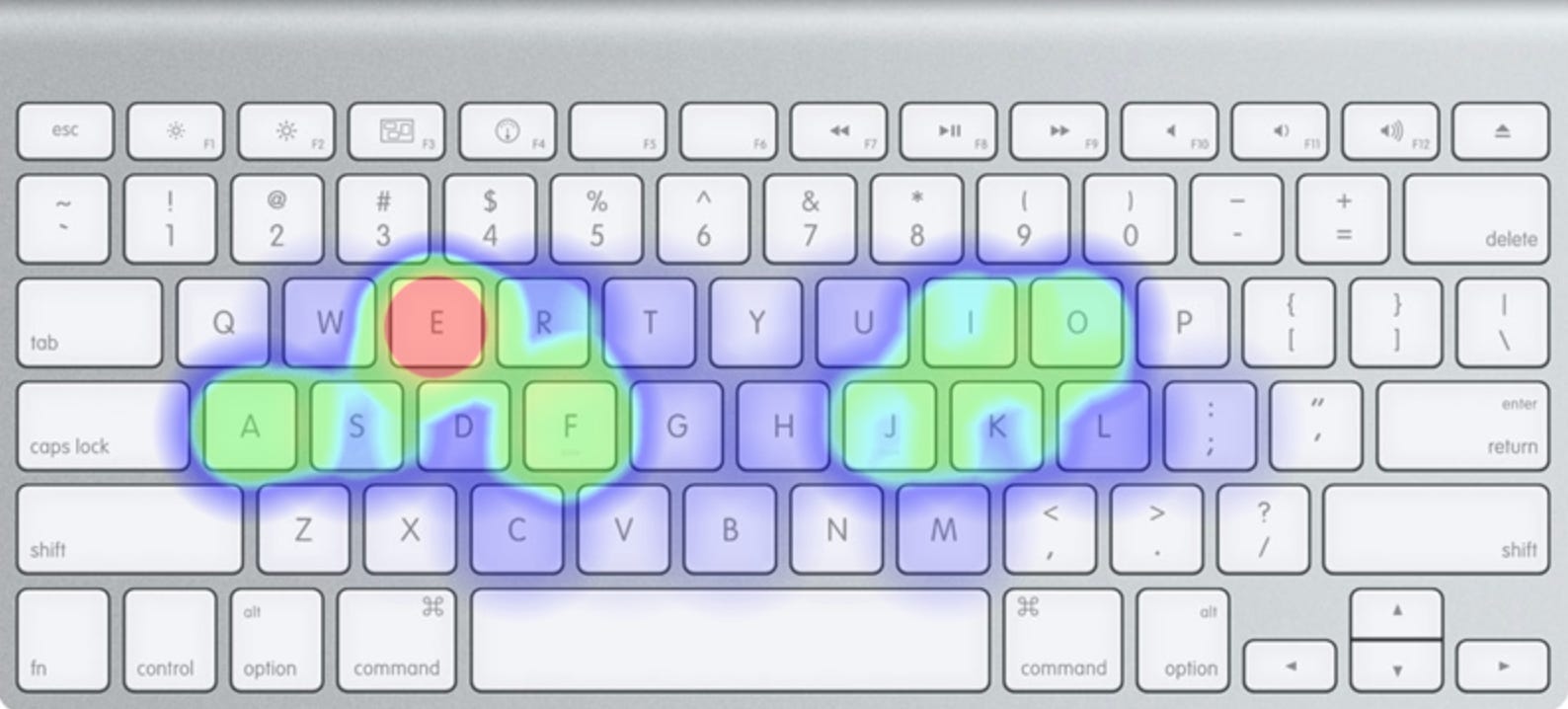
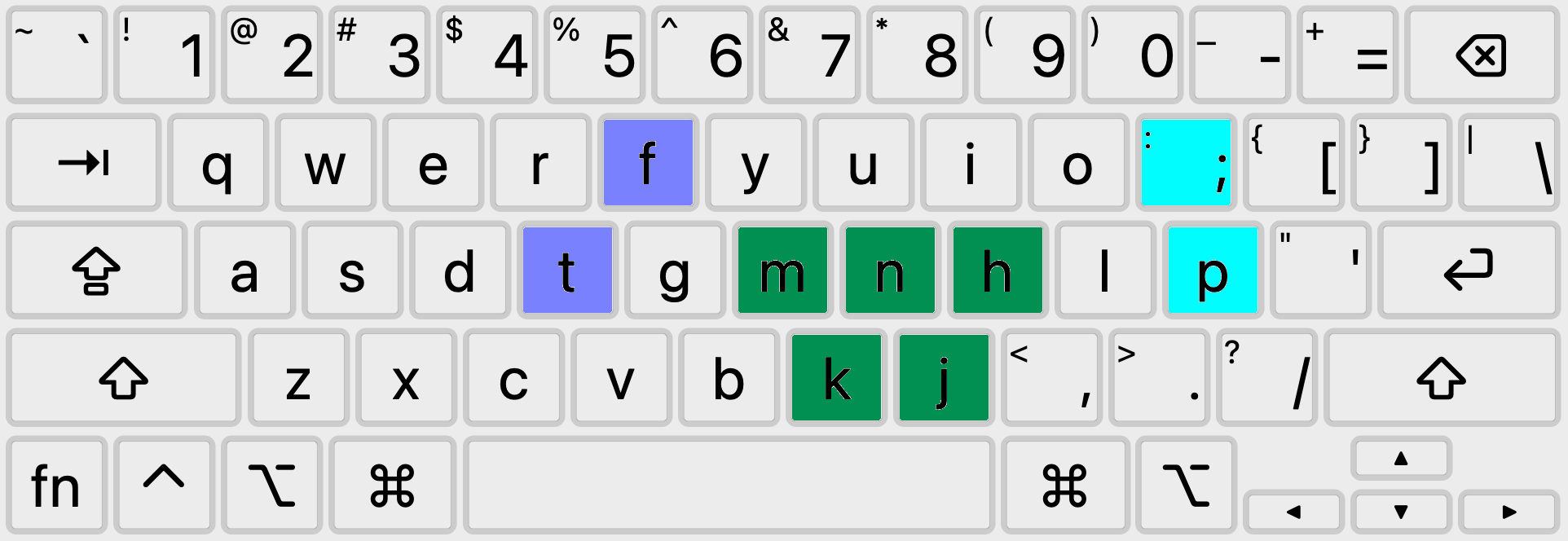
In just 9 key changes:
Why another layout?
The Qwerty keyboard layout sucks to type on. Unfortunately, the alternatives aren't very appealing - Dvorak, Colemak and others are improvements ergonomically, but at the cost of being extremely difficult to learn, often swapping 20+ keys from their original Qwerty positions. Other layouts change fewer keys (Minimak, etc.) but don’t do enough to fix Qwerty’s problems.
Rather than creating a layout 100% optimized for ergonomics, I want to create a layout that’s “good enough” - fixing the biggest pain points of Qwerty while changing the fewest keys possible.
Criteria for a good keyboard layout:
Easy to learn: minimal changes from QWERTY. Letters that move should stay on the same finger if possible.
Comfortable: The 10 (and especially the top 3) most common bigrams, trigrams and English words should be very comfortable to type.
Ergonomic: the most commonly used letters are in the strongest finger positions.
I would rank the strength of the finger positions like this:
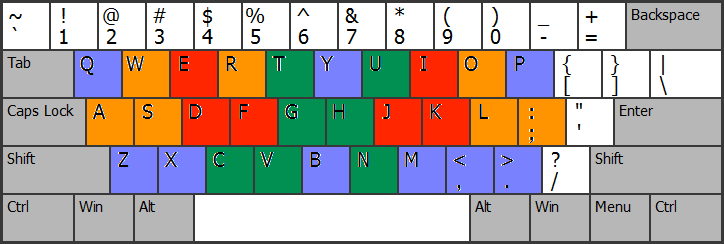
Tier 1: Red (strongest, most comfortable)
Tier 2: Orange
Tier 3: Green
Tier 4: Purple (weakest, least comfortable)
This is of course subjective and will vary for each person, but I think this ranking is a good baseline. The asymmetry in the ratings for Y/T and C/M reflects the asymmetry of most non-orthogonal keyboards.
What are the main problems with Qwerty?
Some of the most common words in English - the, and, in, it, that - are awkward to type due to the positions of T, N and H.
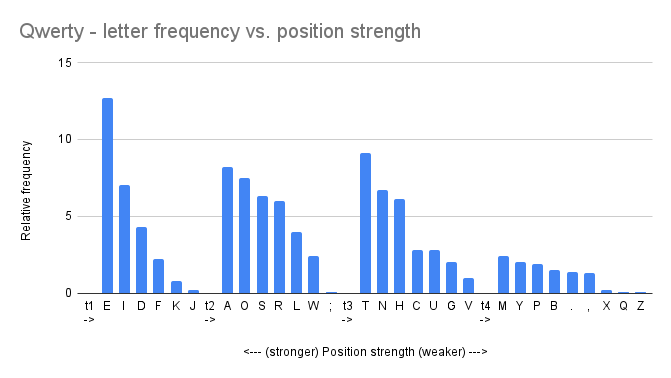
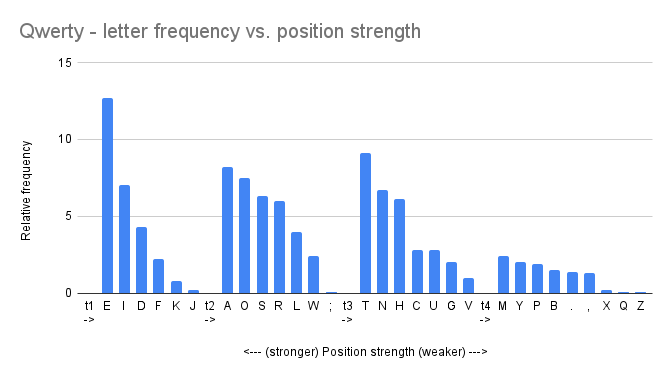
The Qwerty layout has some of the least frequently used letters in strong finger positions (J, K), and some of the most frequently used letters in weak finger positions (N, T).
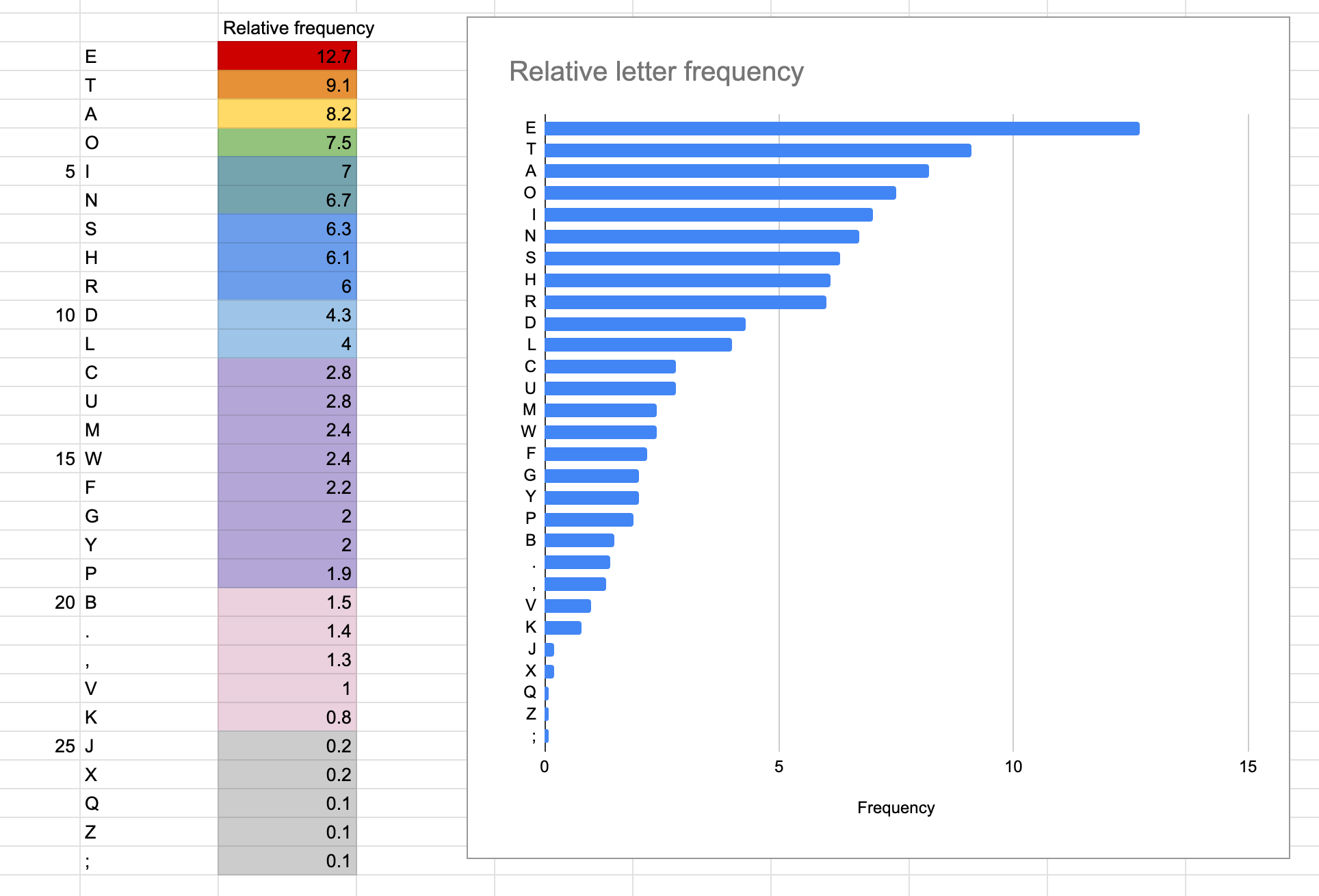
Letter frequency in English texts:
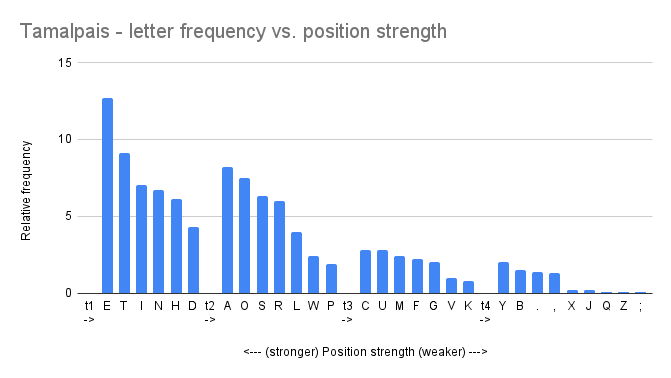
Letters sorted by their position strength tier in Qwerty:
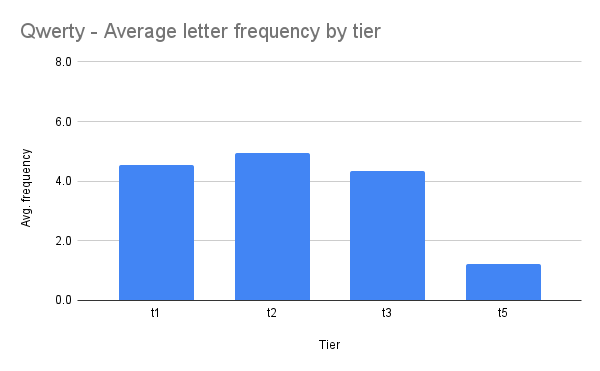
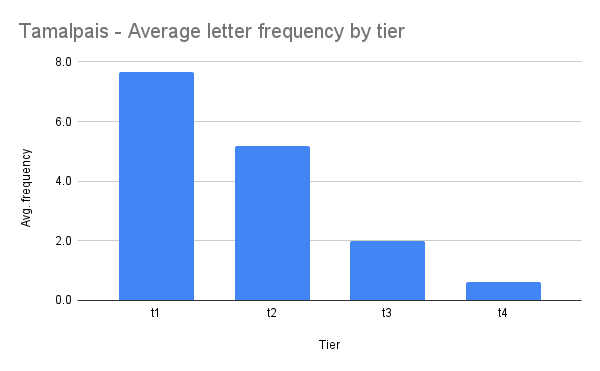
Average frequency by position strength:
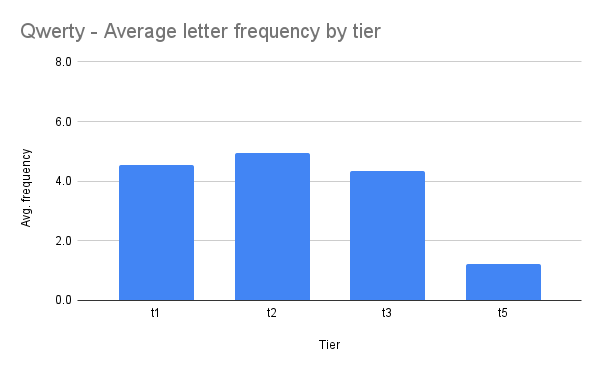
Ideally, we want a chart that slopes down and to the right, with the strongest position tiers containing the highest frequency letters.
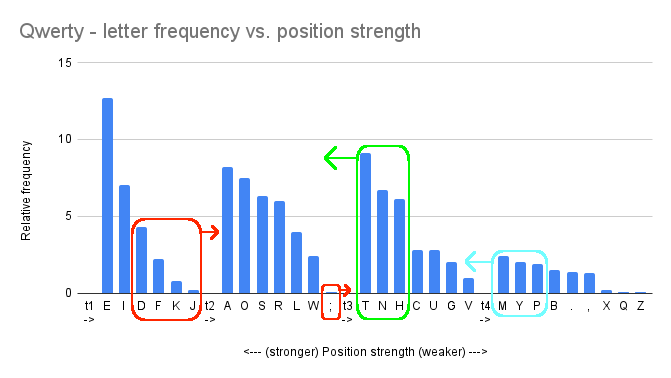
The major outliers are F, J, K, J and “;” (low frequency, but in strong positions), and T, N, and H (high frequency, but in weak positions). The minor outliers are M, Y, and P, which are uncommon, but not so infrequent that they should be in the worst position tier.
How can we fix this?
Starting from Qwerty:
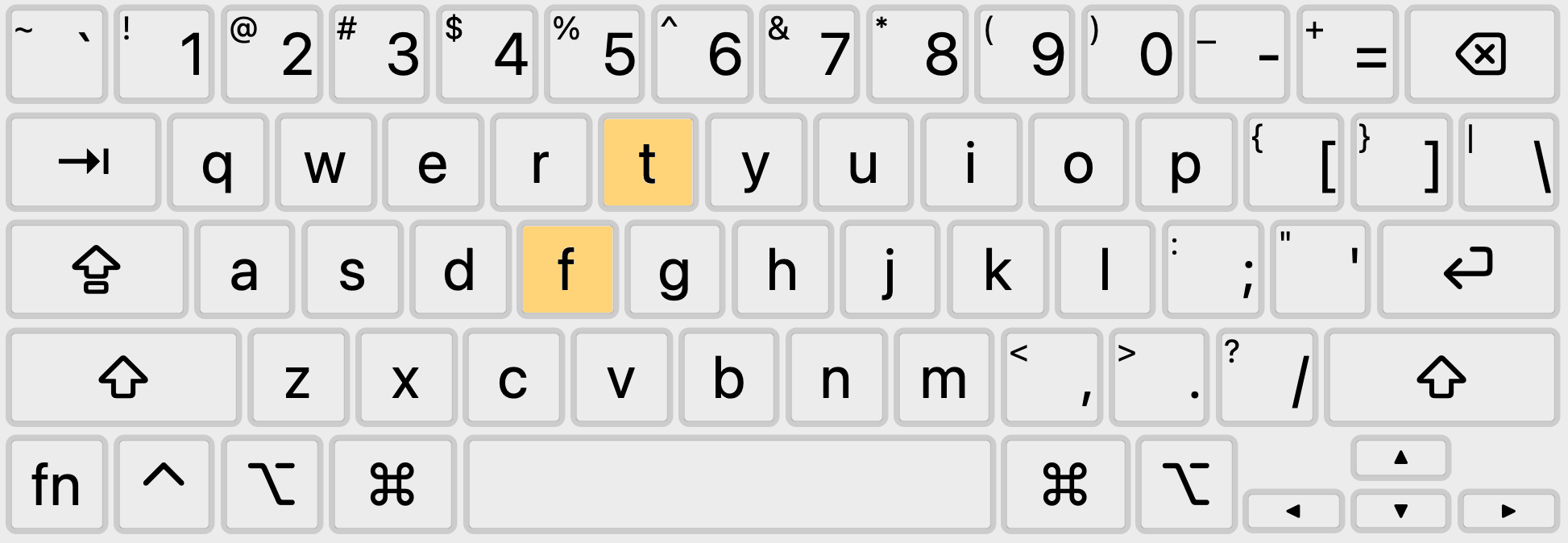
F (uncommon) and T (common) are on the same hand and finger, so they are an easy swap.
N and H should move inward to better positions, while J and K should move outward to worse positions. After swapping H-K and N-J, we get:
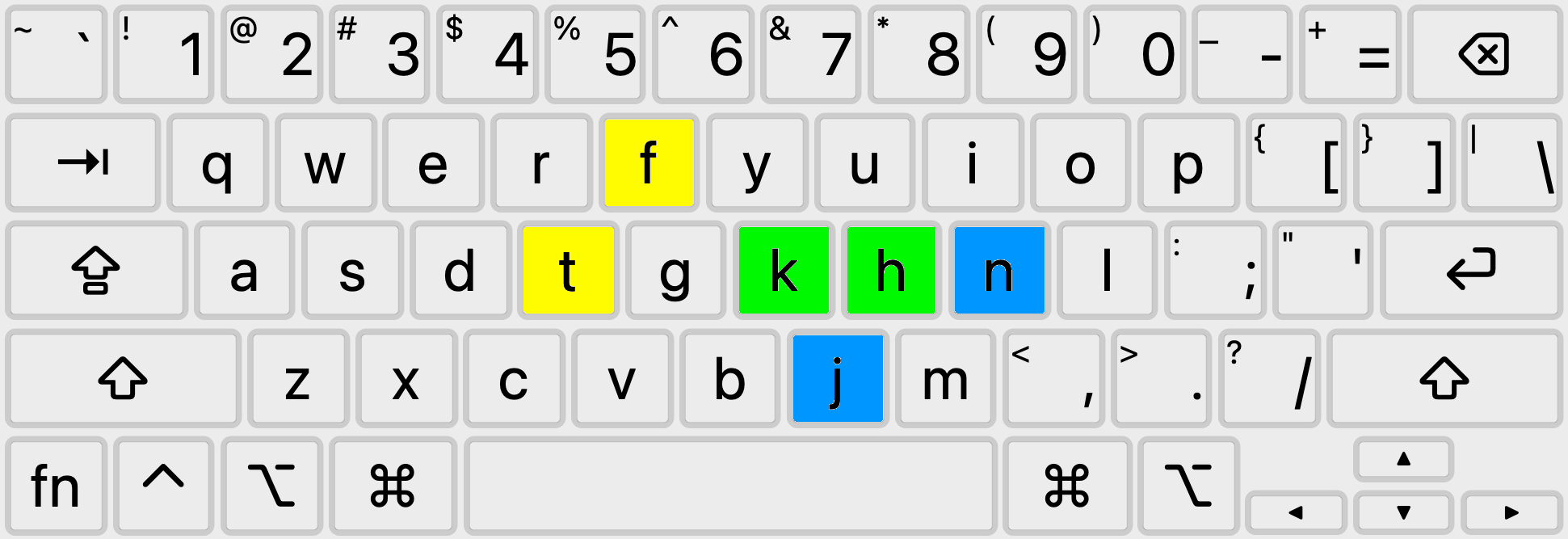
Let's type through the most common trigrams, bigrams and words and see if there is anything uncomfortable.
Words:
the of and to a in for is on that by this with I you it not

Trigrams:
the and ing her hat his tha ere for ent ion

Bigrams:
th he in er an re on at en nd ti es or te
"in" and "ing" are same finger-patterns in this layout. This is a big problem, given that those patterns are so common. What if we swap N-H?
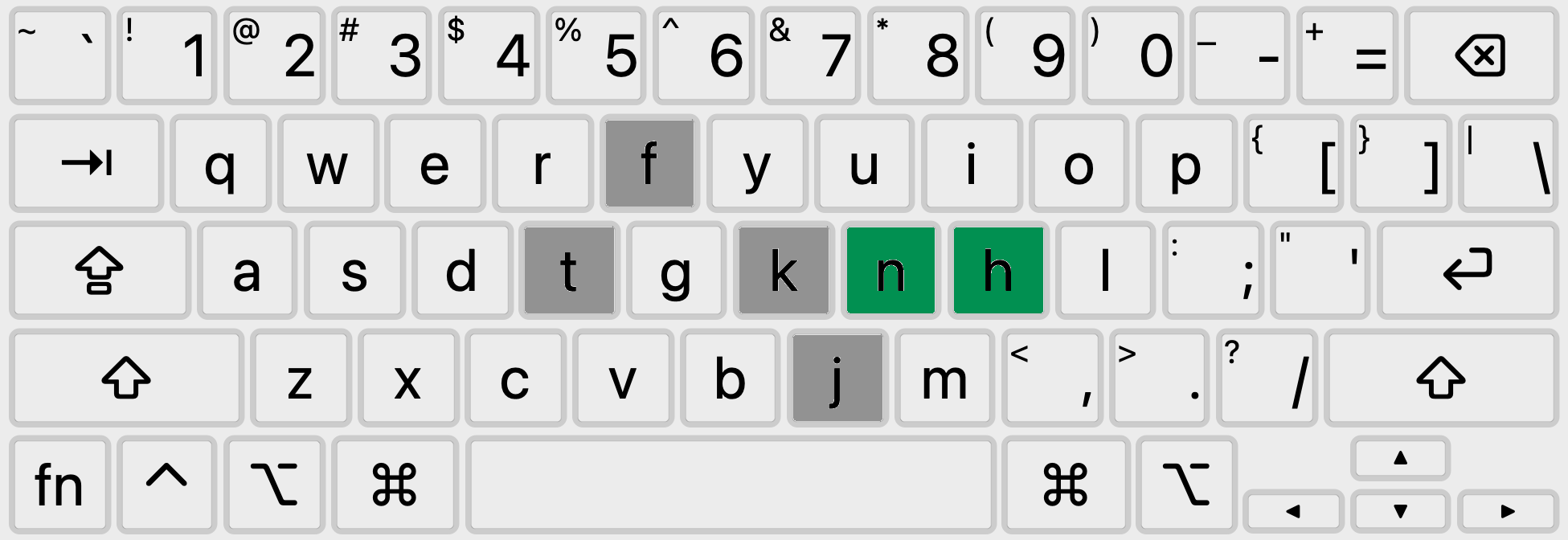
Now the "in" and "on" bigrams feel very smooth. Going through the top patterns again, "hi" is a same-finger pattern, making all "this" and "his" a bit awkward. This isn't perfect, but the upward same-finger motion on the middle finger is a lot easier than the downward same-finger motion, and “hi” is much less common than “in”.
M is in a one of the worst positions, but it's a moderately used letter. We can swap M-K and put M in H’s original Qwerty spot.
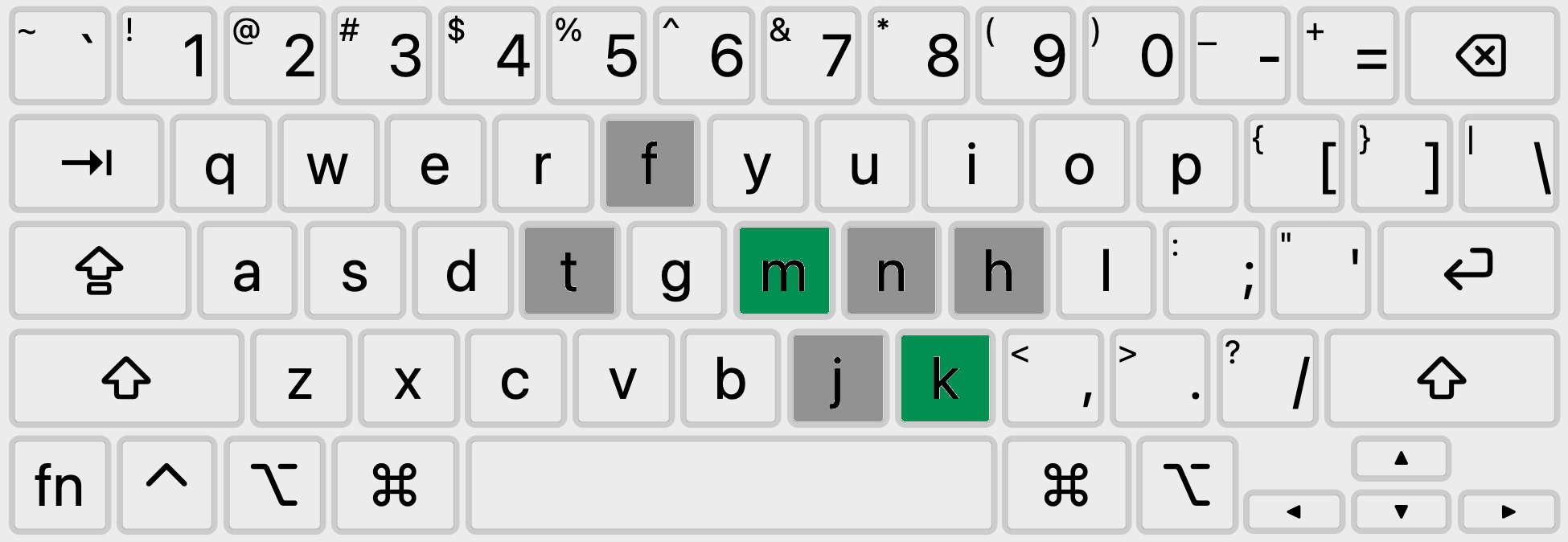
K is much more common than J, so let’s swap them to put K in the better position.
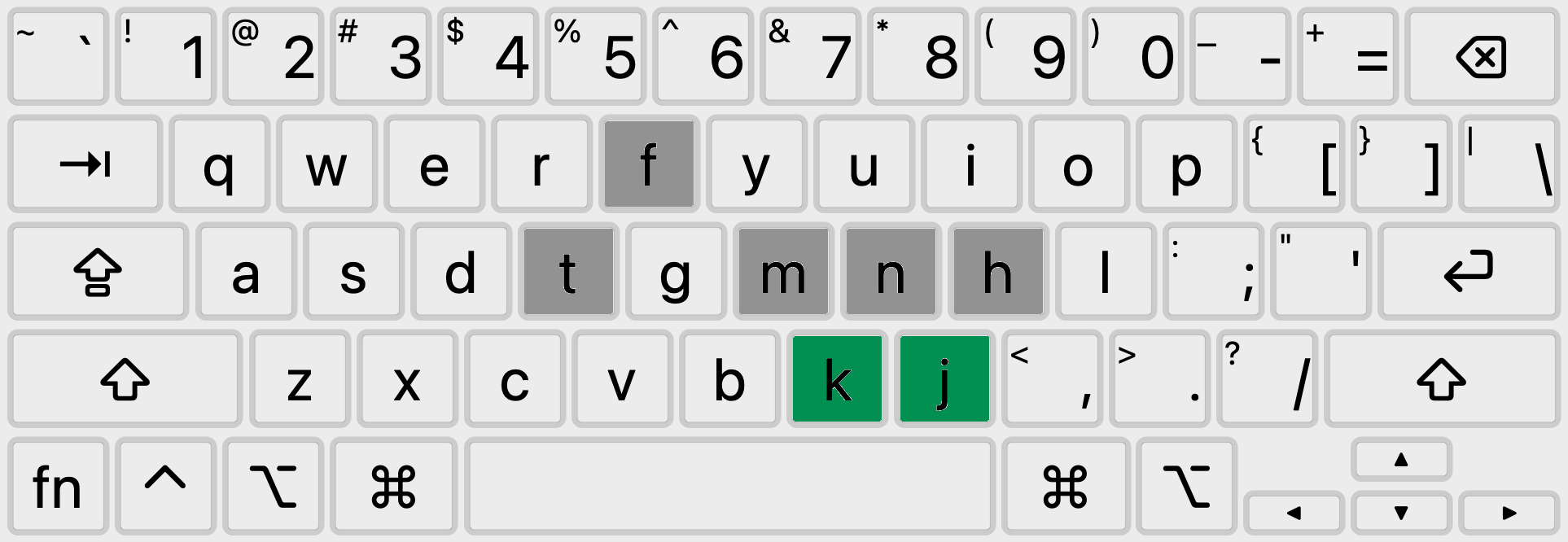
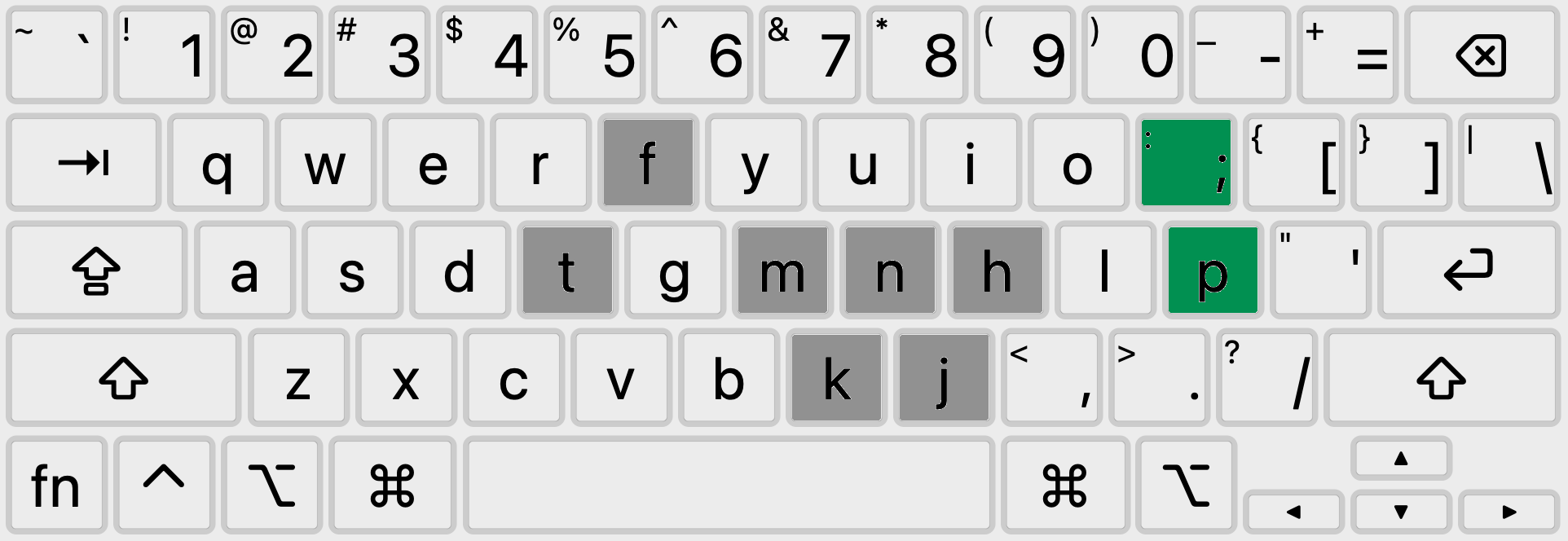
P is in a one of the worst positions, which makes "po", "pl" and "ph" very uncomfortable to type. ";" is in one of the better positions, despite being very infrequently used. Both characters are on the pinky finger, so they are an easy switch. All the common P words now become more comfortable to type (up, people, part, place, help, play, put).
Heatmaps
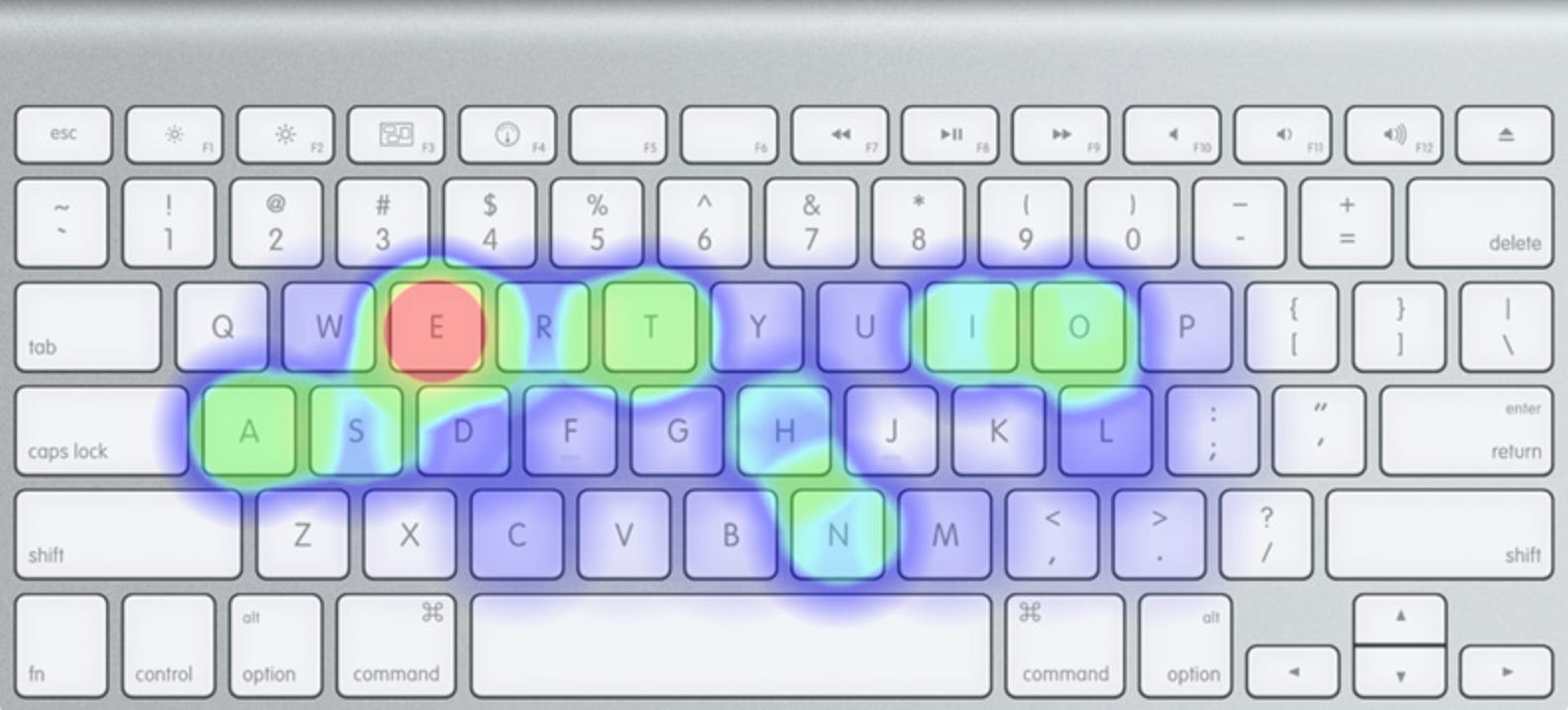
Compare the heatmap of this layout to a heatmap of Qwerty -
Qwerty:
Tamalpais:
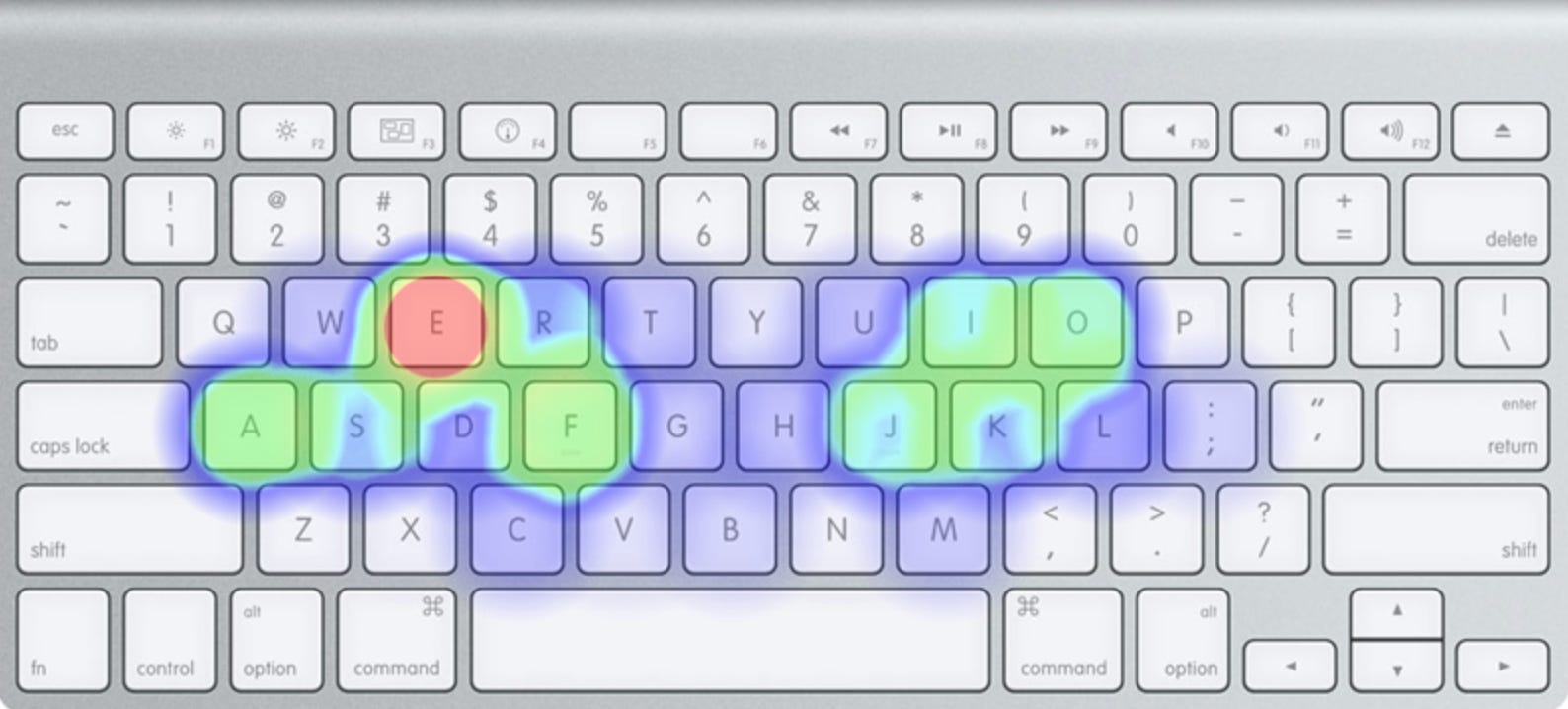
(input text = a block of characters with letter frequencies proportional to their relative frequencies in English texts)
Letter frequency by tier - Qwerty vs. Tamalpais:
Average letter frequency by tier - Qwerty vs. Tamalpais:
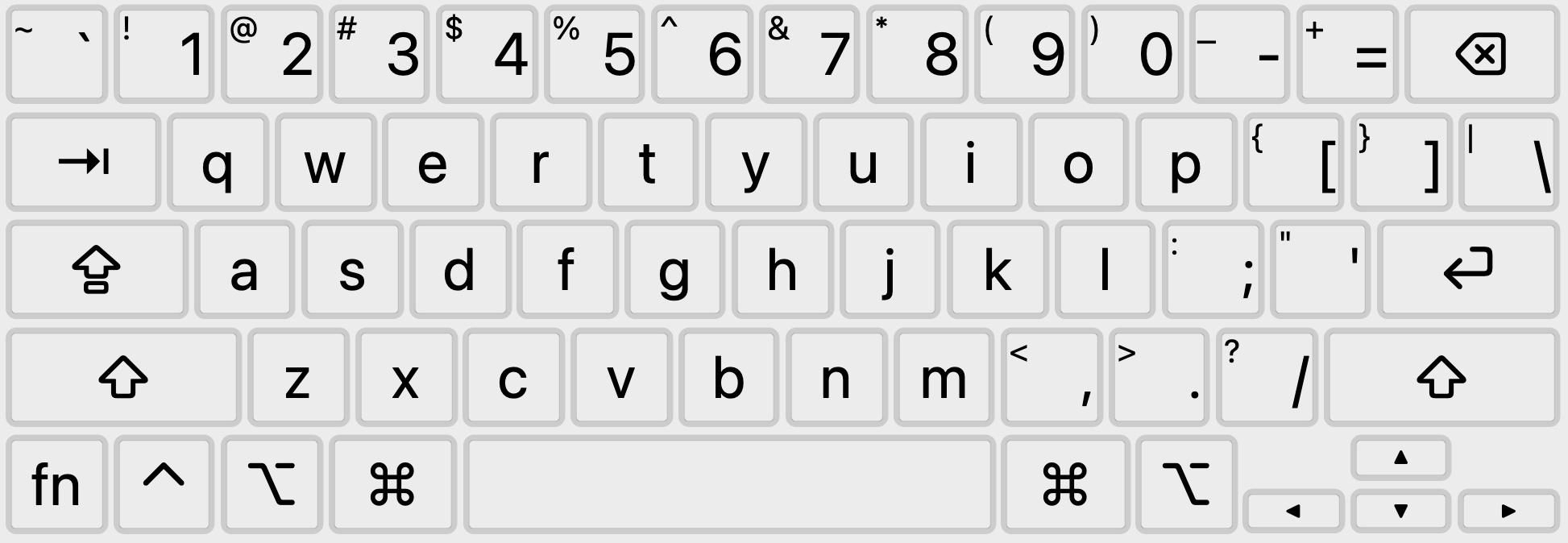
Final result
Qwerty:
Tamalpais:
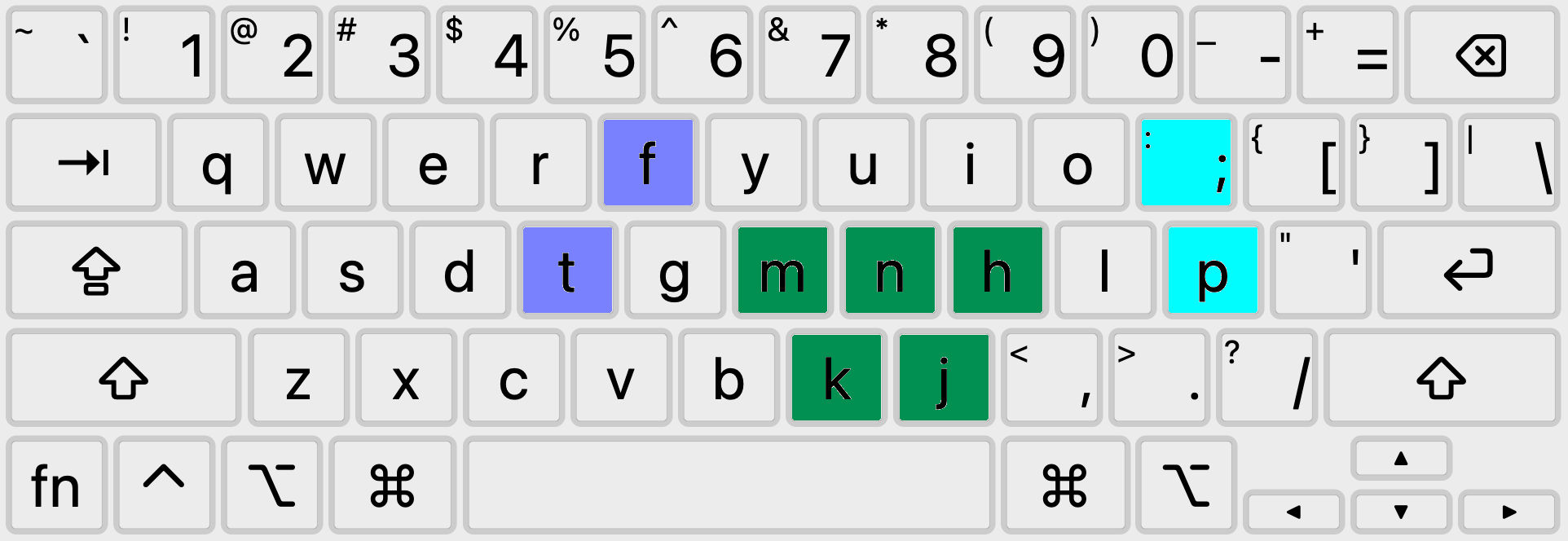
Ease of learning
This layout changes 9 characters from their Qwerty positions. 7 characters stay on the same finger (T, F, N, J, K, P, “;”), making them easier to relearn. Only 2 letters change fingers (M, H). No letters change hands. The most common keyboard shortcuts (Command-Z, X, C, V, Q, W) are preserved.
Try it out
To get a feel for this layout while still using Qwerty, here are the top 10 words, trigrams and bigrams on Tamalpais translated to Qwerty:
(i.e. the finger pattern to type "fke" on Qwerty is the finger pattern needed to type "the" on Tamalpais)
Words -
Qwerty:     the of and, to in for, is on that, by this with, you it not
Tamalpais:  fke ot ajd, fo ij tor, is oj fkaf, by fkis wifk, you if jof

Trigrams -
Qwerty:     the and ing, her hat his, tha ere for, ent ion
Tamalpais:  fke ajd ijg, ker kaf kis, fka ere tor, ejf ioj

Bigrams -
Qwerty:     th he in, er an re, on at en, nd ti es, or te
Tamalpais:  fk ke ij, er aj re, oj af ej, jd fi es, or fe
Downloads
Tamalpais.keylayout (Mac)
Windows version - coming Soon (tm)
Installation
Mac -
Place Tamalpais.keylayout in: /Library/Keyboard Layouts/
Log out and log back in.
Go to System Settings → Keyboard → Text Input/Input Sources → Edit → click the “+” in the lower left hand corner → scroll to the bottom of the first column, select “Others” → select “Tamalpais” in the second column → Add.
Practice suggestions
Practice the layout for 10 minutes each day. Once you feel moderately comfortable, switch completely without going back.
Thanks for reading! Give it a try and let me know what you think.

View from Mount Tamalpais by Slav Romanov
Addendum
Muir Woods
See this article for the Muir Woods layout, which makes 13 changes from Qwerty:
<coming Soon tm>
Muir Woods layout download (mac)
This layout is even more comfortable to type on than the Tamalpais layout, in exchange for being a bit more difficult to learn.
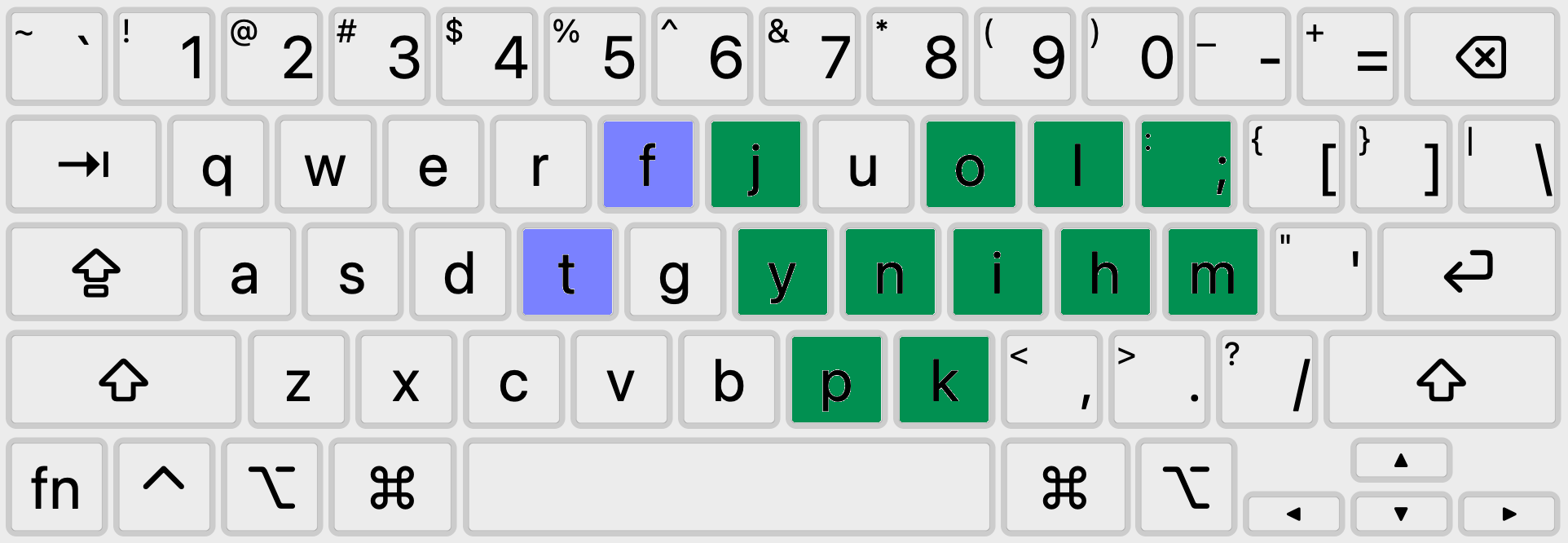
Muir Woods layout
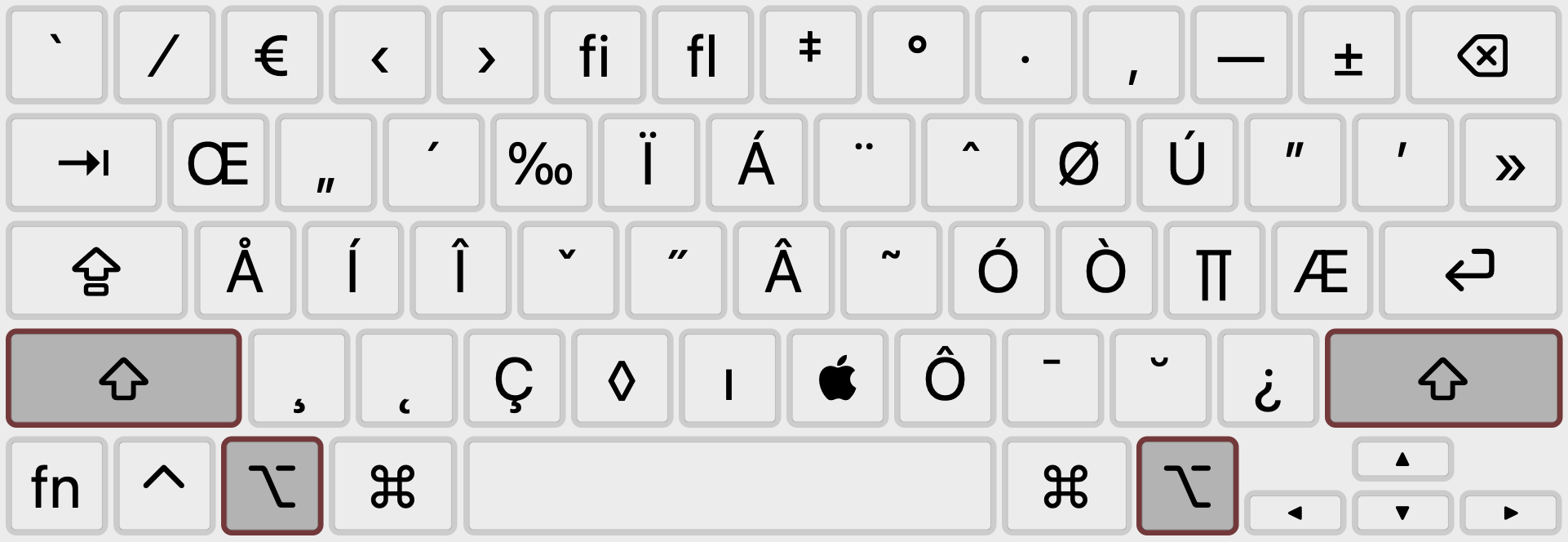
Option mappings
Tamalpais Option mapping:
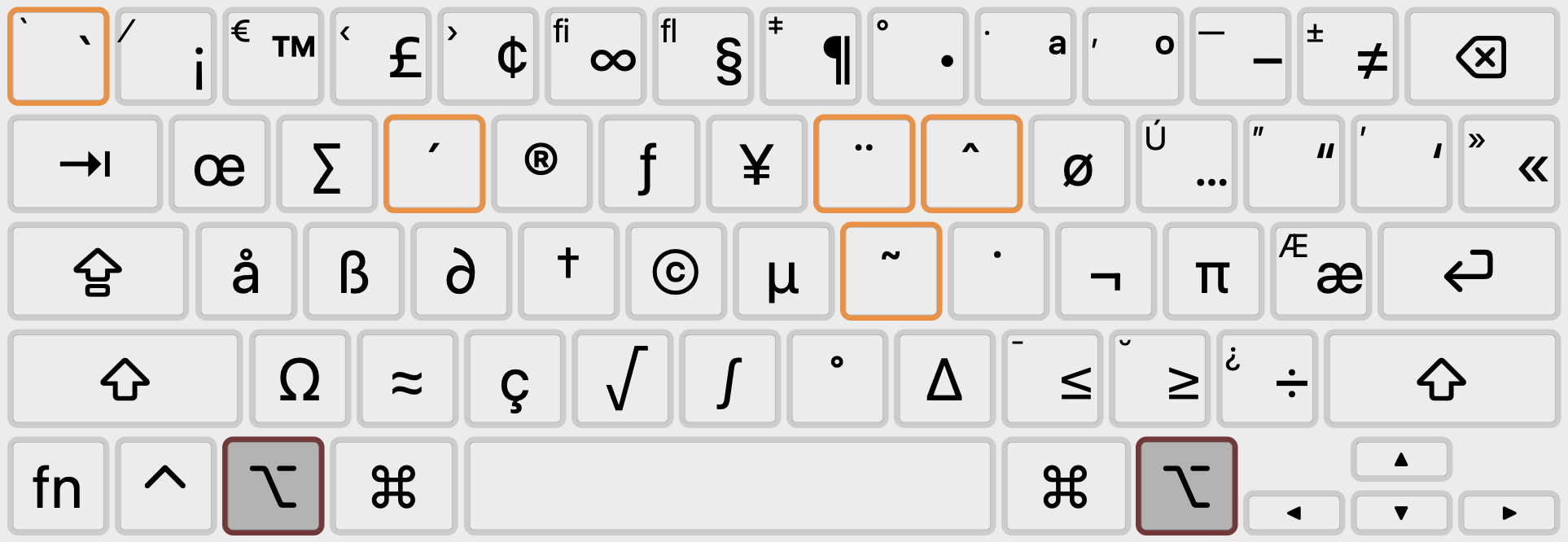
Tamalpais Option-Shift mapping:
Other keyboard layouts and their issues
General observations:
Clean slate design/optimizing in a vacuum is a terrible idea when you take in to account that >99% of users will be learning your layout starting from Qwerty. The most important metric for alternative layouts is “number of changes from Qwerty”.
Having an uncomfortable "and" or "the" makes a layout completely unusable. A lot of the other layouts focus on optimizing other metrics ("effort", "finger penalty", etc. -the effectiveness of which depends completely on the parameters of the model used to create the metric), while ignoring what to me is the most important criteria for comfort: are the most commonly used words easy to type?
The biggest factor in this is leaving H in an uncomfortable spot in the middle column, leading to an uncomfortable “the” (which is by far the most commonly used word in English). H is not the most common letter, but the fact that it’s part of the most common word means it can’t be left in an uncomfortable position.
Designing solely to maximize middle row usage may not be correct given that the middle finger is almost as comfortable resting and typing on the top row instead.
Another common issue I find with other layouts is placing high frequency letters on weak fingers (4th and 5th fingers).
Issues with other layouts:
Small # of changes from Qwerty:
Minimak 4 - Leaves H in an uncomfortable position. Swaps E to another hand, probably for hand balance, but no improvement in position strength since E is already in a strong position. Retraining a heavily used letter is hard. T changes fingers. J is still taking up a good spot
Minimak 8 - "The" still uncomfortable.
Medium # of changes from Qwerty:
Carpalx QWKRFY - 10 changes. "and" is uncomfortable. "he" doesn't feel good. (H on center column)
CarpalxQ (Jay Walker) - 11 changes. H still on center column. K is taking up a good spot. O on pinky
QWPR (Jameson Quinn) - 11 changes. H still on center column. E (the most common letter) on pinky (weak)
High # of changes from Qwerty:
Dvorak - ~32 changes, lots of keys change hands/fingers. No one has time to learn this.
Colemak - 17 changes. "the, he" doesn't feel good (H key in weak position on center column). O on pinky. F in one of the strongest positions. Moves E when it was already in a great spot
Colemak mod-DH - “the” and “and” are still not that comfortable to type - both use a lower row letter. D and H both in poor positions despite being used fairly frequently. O (fairly common letter) is on the pinky (weak finger).
Norman - 14 changes. "he" and “hi” don't feel good (H on pinky). Imo moving R isn’t worth it, nor is the E-D swap, nor is moving I when it’s already in a strong position. M is in a very uncomfortable spot, while Y and P (less common letters) are in better spots. I also don’t like O on the 4th finger.
Workman - 21 changes. Uncomfortable “and, of, for” (very common words). I dislike the pinky-index rolls in “in” and “that”. I is too common of a letter to be on the pinky finger.
Other Resources
1,000 most common US English words
Punctuation frequency - to get relative score per 100 characters (comparable with the wikipedia article letter frequency score), divide score by 4.7 (average word length), then divide by 10.
The search for the world’s best keyboard layout - a long overview of alternative keyboard layouts
Ukelele for Mac lets you create and edit custom keyboard layouts
Karabiner-Elements for Mac lets you use predefined rules to customize your keyboard. e.g. Caps lock → Escape (vim), Single press shift → Parentheses, etc.
Split keyboards: Kinesis Freestyle2 (a good intro), mechanical split keyboards: Alice 2.4g Wireless Split or Debroglie Wired Split

View from Mount Tamalpais by Slav Romanov